Last Updated: 2 March 2026
Your YouTube background is the unsung hero of your video's production value. A great background makes you look professional, builds trust with your audience, and helps tell your story before you've said a word. A bad one does the opposite: it distracts viewers, looks unprofessional, and can make your content feel cheap, even if the information you're sharing is excellent.
A good background is an essential part of becoming a YouTuber. Many creators believe a high-quality YouTube background requires a dedicated studio or an expensive setup. They see their favorite YouTubers with elaborate, custom-built sets and assume it's out of reach, so they settle for a messy bedroom or a plain, boring wall. This is a missed opportunity.
Your background is a powerful tool for visual branding and viewer engagement. It sets the tone, establishes your niche, and can be the difference between a viewer who clicks away and one who subscribes. The good news is that creating an effective YouTube background has very little to do with how much money you spend. It's about being intentional.
With the right approach, you can create a professional-looking setup that enhances your content, no matter your budget.
Why Your YouTube Background Matters More Than You Think
A YouTube background does more than just fill the space behind you. It's a critical part of your channel's visual identity and has a direct impact on how viewers perceive your content. A well-thought-out background adds a layer of professionalism that signals to viewers that you take your content seriously. This builds subconscious trust and authority, making them more likely to listen to what you have to say.
It also plays a key role in managing viewer attention. A cluttered or distracting background pulls focus away from you and your message. A clean, intentional YouTube background, however, keeps the viewer's attention exactly where you want it: on you.
Your YouTube background is a form of visual storytelling that communicates your personality, your niche, and the overall vibe of your channel. A tech reviewer might have shelves of organized gadgets, while a cozy book-focused channel might use warm lighting and bookshelves. Your background is working for you long before your video's hook is delivered.
The Three-Tier Budget Framework
Creating a professional YouTube background doesn't require a Hollywood budget. You can achieve a polished look at any price point by focusing on a few key principles: depth, lighting, and personality. Here's how to approach it across three common budget tiers.
$0 – $50
Zero Budget
Key Focus: Declutter & Depth
$50 – $250
Mid-Range
Key Focus: Control & Personality
$250+
High-End
Key Focus: Customization & Branding
| Budget Tier | Key Focus | Example Elements |
|---|---|---|
| $0 - $50 | Declutter & Depth | Natural light, tidy existing space, one or two personal items. |
| $50 - $250 | Control & Personality | Dedicated lighting, simple backdrop, curated props. |
| $250+ | Customization & Branding | Custom-built sets, advanced lighting, branded elements. |
The Zero-Budget Background: Work With What You Have
A professional YouTube background is achievable with absolutely no spending. The goal here is to be resourceful and intentional with your existing environment.
Find the Best Light
Natural light is your best friend. Position yourself facing a window to get soft, even lighting on your face. Avoid having a window directly behind you, as this will create a silhouette and make you hard to see. Good lighting makes any space look better.
Declutter Your Space
This is the most important step. Remove anything from the frame that doesn't need to be there. A tidy, organized space instantly looks more professional. You're not aiming for sterile minimalism, just a lack of distracting clutter. Check your shot in the camera to see what's actually visible.
Create Depth
Don't stand right against a wall. Putting some distance between you and your YouTube background creates a sense of depth that is more visually appealing. If you're in a small room, even a few feet of separation can make a significant difference. This helps the camera focus on you, slightly blurring the background.
The Mid-Tier Background: Invest in Control
With a modest budget, you can move from working with your environment to controlling it. This is where you can start making deliberate choices that enhance your brand.
Invest in Lighting First
A simple three-point lighting setup (a key light, a fill light, and a backlight) will elevate your video quality more than any other purchase. You can start with a single ring light or softbox for your key light. Good lighting gives you consistency, meaning you can film at any time of day and your videos will always look the same.
Use a Simple Backdrop
If your natural environment isn't suitable, a simple backdrop is a great investment. This could be a roll of seamless paper, a fabric backdrop, or even a freshly painted wall in a neutral color. This gives you a clean canvas to build upon.
Add Personality with Props
This is where you start telling a story. Add a few intentional items to your YouTube background that relate to your niche. For a channel about productivity, you might have a clean desk with a stylish lamp and a few books. For a gaming channel, you could have some subtle, curated merchandise or collectibles on a shelf. The key is "curated" - don't just add clutter.
The High-End Background: Build Your Brand World
With a larger budget, you can create a fully customized set that becomes synonymous with your brand. This is about creating a unique and memorable environment.
Custom-Built Sets
This could involve building custom shelving, creating a unique wall texture, or designing a multi-functional space. This is your chance to build a world that is instantly recognizable as yours. Think about how you can incorporate your brand colors and logo in a subtle, stylish way.
Advanced Lighting & Color
Go beyond basic lighting with practical lights (lamps, LEDs in the shot) and colored accent lights. Use RGB light strips to add a splash of your brand color to the background. This creates a more dynamic and visually interesting scene.
Incorporate Your Branding
This is where you can add neon signs with your logo, custom artwork, or other elements that reinforce your brand identity. The goal is to create a space that no one else can replicate. When viewers see your YouTube background, they should know instantly that they're watching one of your videos.
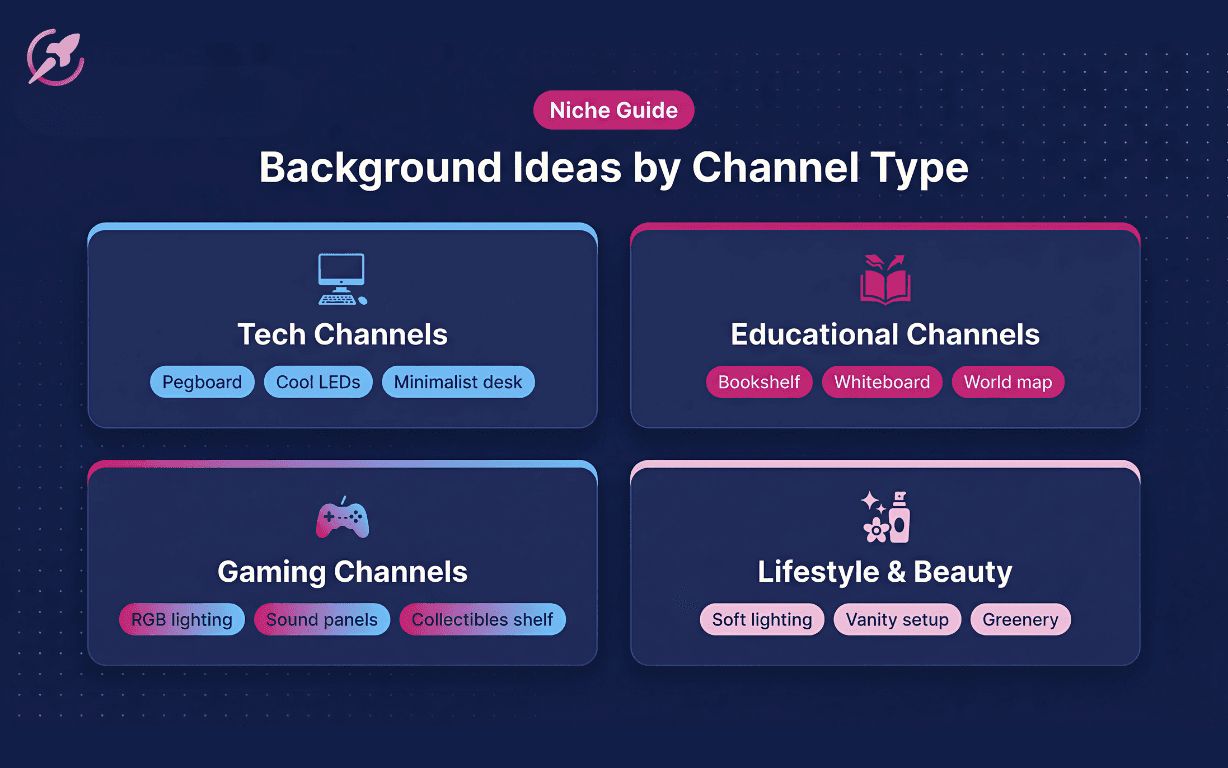
Background Ideas for Different Niches
Your YouTube background should feel authentic to your content. A tech reviewer and a yoga instructor will have very different needs. Here are some ideas to get you started.
For Tech Channels
Clean lines, organized technology, and a modern aesthetic work well. Think pegboards with neatly arranged gadgets, minimalist desks, or shelves with curated tech products. Use cool-toned LED lighting to create a futuristic feel.
For Educational Channels
A background that inspires learning and authority is key. A bookshelf is a classic for a reason - it works. You could also use a clean whiteboard, a world map, or framed diagrams. The goal is to create an environment that feels credible and focused.
For Gaming Channels
This is a chance to be more expressive. RGB lighting is almost a requirement. You can also use sound-dampening panels (which are both practical and look great), shelves with collectibles, or a green screen to project gameplay or branded graphics. Just be careful to avoid it looking like a teenager's messy bedroom.
For Lifestyle & Beauty Channels
A background that feels aspirational and aesthetically pleasing is important. Think soft lighting, clean and organized vanity setups, and perhaps a pop of greenery with a houseplant. The background should reflect the lifestyle you are promoting.
What to Do Next with Your Background
Your YouTube background is a living part of your channel, not a one-time setup. As your channel grows and your style evolves, don't be afraid to tweak and update it. Small changes, like swapping out a plant or adding a new piece of art, can keep your visual presentation feeling fresh. The most important thing is to create a space that you feel comfortable and confident filming in. Your background is a reflection of your brand, so make it one you're proud of.
Related Guides
Looking to grow your faster? Get started with ChannelBoost to track your channel's performance and find what's actually working.